Budgets that match your pay cycle
Set a custom month start day. If salary lands on the 25th, your budget runs from the 25th - not two awkward half-months.
Features
Income, planned savings, recurring payments, and day-to-day expenses - tracked on your family's devices, summarized by category and person, with receipt scanning and a loan calculator built in.
Free forever · Works offline · No account needed
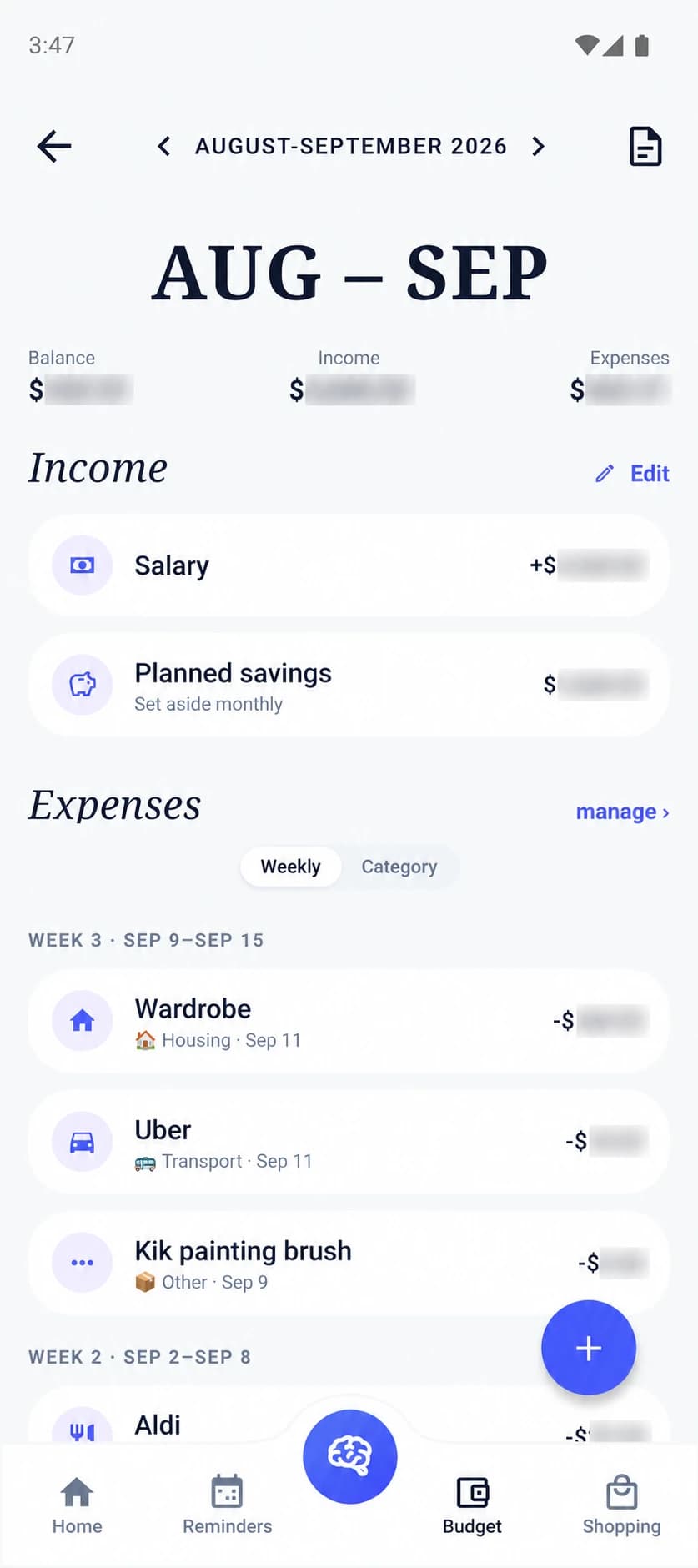
Set a custom month start day. If salary lands on the 25th, your budget runs from the 25th - not two awkward half-months.
Record income and set aside planned savings up front, so the balance that remains is the one you can actually spend.
Rent, insurance, and subscriptions tracked by day-of-month, as part of the plan rather than surprise debits.
Food, transport, housing, utilities, health, education, and more - logged per family member, in the currency you choose.
Photograph a receipt and OCR pulls out the merchant, total, and line items. Expenses practically file themselves.
'Can I afford €150 this weekend?' The on-device assistant checks the month's budget and answers - nothing sent anywhere.
Run EMI math on a loan and save it to compare scenarios later - useful before big family decisions.
Totals by category and by member, weekly grouping, and filters to answer 'where did it go?' in seconds.
Everything sits in the encrypted on-device database. There's no bank connection, no credentials, and no server copy.
Enter income, planned savings, and the fixed payments you already know about. Pick the day your budget month begins.
Add expenses manually, photograph receipts and let OCR extract them, or tell the assistant what you spent.
Summaries roll spending up by week, category, and family member - so the honest conversation has honest numbers.
Budget apps assume money arrives on the first of the month. Real salaries land on the 25th, the last Friday, or whenever payroll runs - and a calendar-month budget splits the cycle awkwardly in two. FamiliaSync lets you set the day your budget month begins, so the plan wraps around your pay cycle instead of fighting it.
The order matters too. Income and planned savings go in first, recurring payments - rent, insurance, subscriptions - are part of the plan rather than surprise debits, and the balance that remains is the honest one. You budget from what is actually spendable, not from the number at the top of the statement.
A family budget only works if both partners are looking at the same truth. Spending logs per family member and category, summaries roll up by week, and filters answer 'where did it go?' in seconds instead of at the end of a statement. When devices are paired, those numbers live on both phones - the honest conversation gets honest figures.
The on-device assistant closes the last gap: asking 'can I afford 150 this weekend?' checks the current month's budget and answers on the spot. No tab-switching, no mental arithmetic, and - because the assistant runs on-device - no third party learning what your family spends.
Every budgeting app that syncs with your bank asks for credentials and a third-party aggregator sitting in the middle. FamiliaSync skips the whole arrangement: you log expenses yourself, photograph receipts and let on-device OCR pull out the merchant, total, and line items, or just tell the assistant what you spent. The friction bank sync was invented to remove mostly disappears - without the credentials ever existing.
Everything lands in an AES-256-GCM encrypted database on your own devices. There is no FamiliaSync server holding a copy of your finances - not even an encrypted one. A budget is the most sensitive document a family produces; it should live somewhere you control.
Join the waitlist - free forever, with no cloud account needed to get started.
Free forever · No cloud account needed